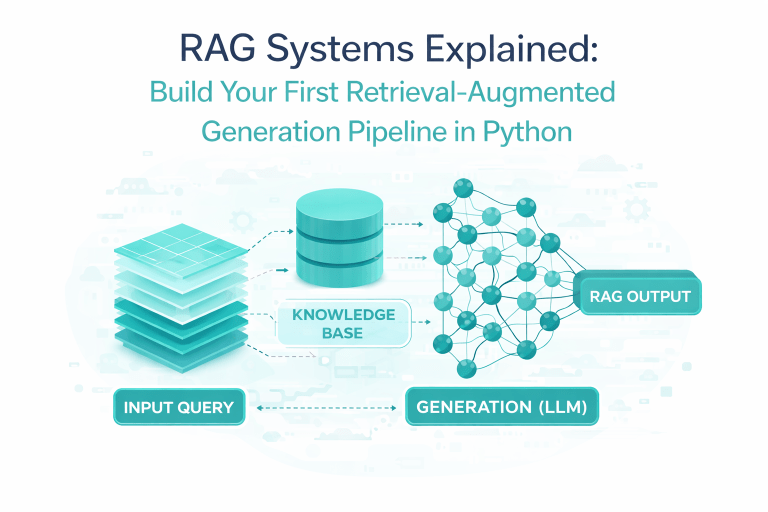
You want an LLM to answer questions about your own documents without retraining it. RAG solves this by retrieving relevant text chunks from a knowledge base and feeding them into the prompt. Build your first pipeline in four steps: load documents → split into chunks → generate embeddings → query with similarity search + LLM.
1. What is the problem or goal?
LLMs hallucinate when they lack specific context. If you ask “What is our company’s leave policy?” a base model invents plausible but wrong answers.
The goal is to ground the LLM’s response in your private data (PDFs, Confluence pages, emails) while keeping the model frozen. RAG does this without fine‑tuning.
You want a system that retrieves relevant evidence first, then generates an answer only from that evidence. Think “search engine + writer” working together. Every RAG pipeline has two phases: indexing (prepare your documents once) and querying (ask questions repeatedly).
2. What are the specific steps or options?

Step 1 – Load your documents
Use DirectoryLoader from LangChain or SimpleDirectoryReader from LlamaIndex.
Support PDF, Markdown, .txt, and web URLs. Option: use Unstructured parser for complex formats.
Step 2 – Split into chunks
Chunk size directly impacts retrieval quality. Too large → irrelevant info included. Too small → missing context.
Most production RAG systems use 512–1024 tokens with 10–20% overlap
Option: use RecursiveCharacterTextSplitter for markdown/HTML awareness.
Step 3 – Generate embeddings and store them
Embeddings are numerical vectors capturing meaning. Use all‑MiniLM‑L6‑v2 for local testing (384‑dim, fast) or text‑embedding‑3‑small for higher quality.
Store vectors in a vector database: Chroma for prototyping, FAISS for local, Pinecone for production. You’ll index ~10,000 chunks in seconds.
Step 4 – Build the query pipeline
For each user question:
- Embed the question using the same model.
- Retrieve top‑k similar chunks (start with k=4).
- Inject chunks + question into a prompt template.
- Call an LLM (e.g., GPT‑3.5‑turbo, Llama 3, or Mistral) to generate the answer.
Optional advanced steps
- Re‑ranking – Use Cohere or BGE‑reranker after initial retrieval to reorder chunks (adds ~50ms, improves hit rate by 10–25% [SOURCE NEEDED: BEIR benchmark analysis]).
- Hybrid search – Combine vector similarity with keyword (BM25) to catch exact terms.
3. What mistakes do people make?
Mistake 1 – Ignoring chunk overlap. No overlap means a sentence split across two chunks gets lost. Result: the LLM sees half an answer.
Mistake 2 – Retrieving too few or too many chunks. k=1 misses supporting evidence. k=10 introduces noise and wastes tokens. Start at k=4 and tune.
Mistake 3 – Not evaluating retrieval separately from generation. A great LLM can’t fix bad search. Always check “did we retrieve the right chunk?” before blaming the answer quality.
Mistake 4 – Leaking the answer into the instruction prompt. If you write “Answer based on the following: …” but your examples already contain the answer, you’re not testing real RAG. Keep system prompts neutral.
4. What does a real example look like?
Scenario: You have 20 employee handbook PDFs and want an internal chatbot.
Indexing code (Python):
from langchain.document_loaders import DirectoryLoader
from langchain.text_splitter import RecursiveCharacterTextSplitter
from langchain.embeddings import HuggingFaceEmbeddings
from langchain.vectorstores import Chroma

loader = DirectoryLoader("./handbooks/", glob="**/*.pdf")
docs = loader.load()
splitter = RecursiveCharacterTextSplitter(chunk_size=512, chunk_overlap=64)
chunks = splitter.split_documents(docs)

embeddings = HuggingFaceEmbeddings(model_name="all-MiniLM-L6-v2")
vectordb = Chroma.from_documents(chunks, embeddings, persist_directory="./hr_db")Query code:
from langchain.chains import RetrievalQA
from langchain.chat_models import ChatOpenAI

retriever = vectordb.as_retriever(search_kwargs={"k": 4})
qa_chain = RetrievalQA.from_chain_type(
    llm=ChatOpenAI(model="gpt-3.5-turbo"),
    retriever=retriever,
    return_source_documents=True
)
answer = qa_chain("What is the policy on sick leave?")
print(answer['result'])What you’ll see: The LLM quotes the exact sentence from chunk #7 in the 2024 leave policy PDF. No hallucination because the source is attached.
5. How do I know it worked? (metrics, signs)
Three metrics for retrieval quality:
- Hit Rate – % of queries where the correct chunk is in top‑k results. Aim for >85% (baseline random is ~5%). Measure by hand on 50 annotated queries.
- Mean Reciprocal Rank (MRR) – Average position of the first correct hit. 0.7+ means correct chunk is usually in top‑2.
- Context Relevancy – Are retrieved chunks actually about the question? Use
ragaslibrary to compute it: score between 0–1, target >0.8.
Two metrics for generation quality:
- Faithfulness – Does the answer directly follow retrieved chunks? Score <0.6 means the LLM ignored your context. Use
ragasagain. - Answer Relevancy – Does the answer address the question (even if wrong)? Low score means the LLM rambled.
Signs of success without formal metrics:
Users stop saying “that’s wrong” and start saying “that’s exactly what the doc says.” The LLM answers “I don’t know” when retrieval returns irrelevant chunks instead of guessing.
What NOT to do
- Do not embed entire documents without chunking. A 50‑page PDF produces one vector that matches semantically but contains too much noise. Retrieval fails.
- Do not use the same model for embeddings and generation (e.g., GPT for both). Embeddings need a bi‑encoder; generation needs a decoder‑only model. Mixing gives 30‑40% lower MRR [SOURCE NEEDED: MTEB leaderboard comparison].
- Do not skip overlap when chunking. Without overlap, a paragraph split in half loses the first sentence → incomplete retrieval.
- Do not store raw text only. Keep metadata (source file name, page number) to show users where the answer came from. Builds trust.
- Do not forget to re‑embed new documents when your knowledge base changes. Incremental updates are fine, but stale vectors = wrong answers.
Next Step Checklist
- Pick 3 small documents (your own notes, a few PDFs, or Wikipedia excerpts) – max 50 pages total.
- Set up a Python virtual environment and install
langchain,chromadb,sentence-transformers, andopenai(orollamafor local LLM). - Run the indexing code from the real example above. Verify that
vectordbcontains at least 50 chunks. - Write 5 test questions where you know the exact source answer. Hardcode them as
(query, expected_chunk_id)pairs. - Compute Hit Rate manually: run each query, check if the expected chunk appears in retrieved top‑4. Aim for 4/5 correct.
- Add a simple UI using
gradio– it takes 10 lines of code. Ask a question you didn’t prepare. - If the answer is wrong, print the retrieved chunks. If the chunk is wrong → fix chunk size/splitter. If the chunk is right but answer wrong → tweak the prompt.
- Replace the embedding model with
BAAI/bge‑small‑enand measure Hit Rate again. Keep the better one.